I recently encountered a compliance issue for an Intune enrolled device. This issue only pertained to one of several enrolled devices.

As you can see, this device failed the Microsoft Defender for Endpoint compliance policy setting called “Require the device to be at or under the machine risk score”.
This is how my compliance policy was configured:
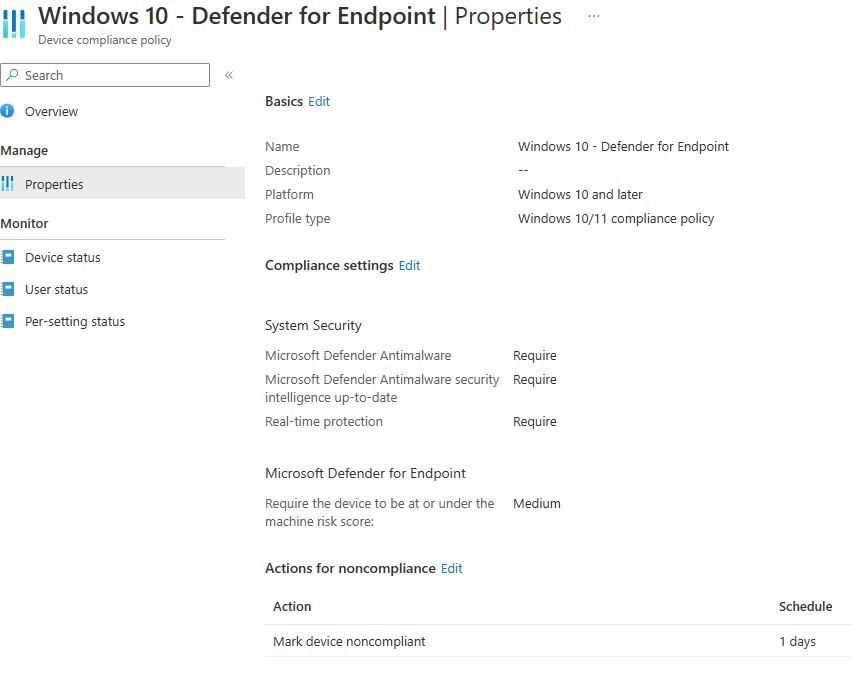
After searching around on the internet going through tens of threads I still could not find any working solution for the issue. I had a look in the Microsoft 365 security portal and could not see any obvious reason why this particular device would have a higher machine risk than the other enrolled devices, which did not have this issue. I also could not find “machine risk” explicitly mentioned anywhere in this portal, which is kind of strange. There is “Risk level” and “Exposure level”, but the device did not differ from the other devices in either of these categories.

After some more searching I found a thread where someone seemed to have resolved this issue by AAD domain joining the device instead of it only being AAD registered. When I checked under Devices in the AAD portal I did notice that this device was Azure AD registered.

I asked the user to disconnect his device from Azure and then connect it again, but this time using the option to join the device instead of just registering it.

After doing this, waiting a bit and also syncing the device the issue still persisted. But when the user restarted his device and logged in with his company credentials it was finally resolved and the device showed as compliant in Intune.

I hope this can help anyone facing similar issues.
 Chris Sonko tech blog
Leave a comment